Forensics of Operating System Agentic AI Activity Traces [Part 1]
![Forensics of Operating System Agentic AI Activity Traces [Part 1]](https://threat.boutique/content/images/20260308195859-download.jpeg)
Background: During incident response, log analysis stages may involve built-in or installed operating system AI helpers such as Claude, OpenAI, and others. Previously, we discussed traces related to IDE agentic helpers. The core skills of agentic AI can be leveraged by threat actors, making such traces important for investigation. Based on this insight, I will begin a series on exposing agentic OS AI traces (Not IDE AI agentic traces), which can help us, as incident response specialists, better understand the root causes of these incidents.
Claude Traces: By itself, the Agentic Claude installer leverages an application developed on Electron, which, under the hood, uses browsers such as Chrome, Edge, and others. This architecture provides the capability to examine traces left by the application. However, the situation changes when dealing with different operating systems like Windows or Linux, as the implementation structures vary significantly across platforms.
Claude traces for Linux:
When Claude is first run at the terminal level, and remains active during an investigation, it is possible to see the initial prompt that was input. This means that using the command ps aux | grep claude, you can expose the process details, including arguments such as the prompt provided at startup.
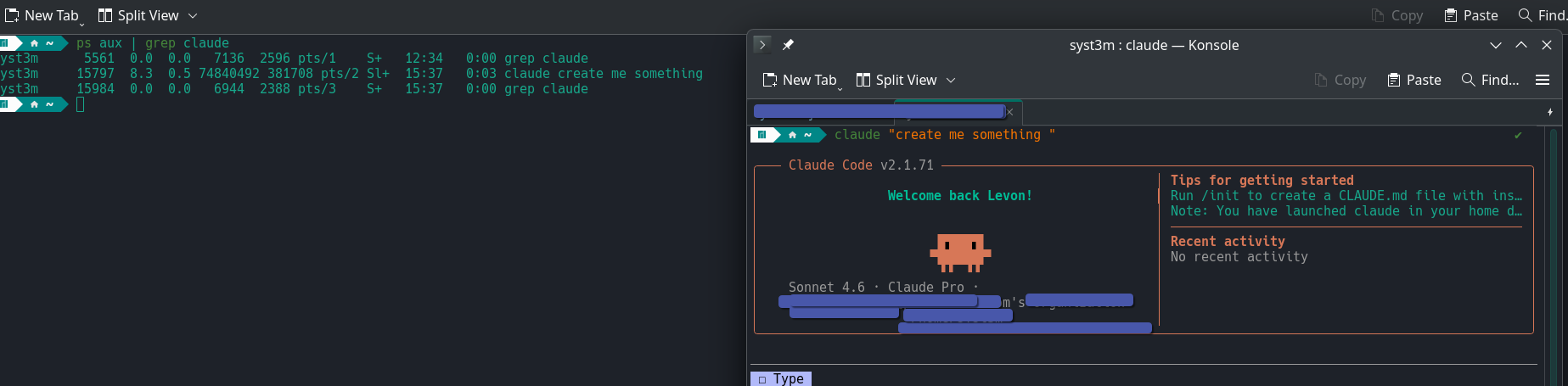
After all this, let's dive one level deeper. Thankfully, on Linux systems, we have multiple types of information available in plain text, which make forensic analysis easier.
For example, in $HOME/.claude/session-env, all sessions established by Claude are visible. The session numbers found here are extremely useful, as they allow us to understand the chain of actions performed during each session.


In addition to session information, Linux stores a variety of data such as your prompts and all temporary files generated by Claude. This information can be found in the $HOME/.claude/ directory.
From a log management perspective, you need to enable auditd with separate logs specifically related to agentic AI processes. Other activity tracing methods do not exist within the built-in capabilities.
Claude traces for Widnows:
Windows has a specific workflow when handling agentic AI applications. When you install Claude, it provides an Electron-based application whose actions are confined within its own environment. However, if you need to install the CLI version, it must be installed on a WSL (Windows Subsystem for Linux) system. This means any CLI activity will occur under the WSL user context. On the Windows core OS side, the only traces you can find are located in C:\Users\YOURACCOUNT\AppData\Local\Packages\Claude_RandomString, which contains browser data. For CLI activity within WSL, you should follow the Linux traces instructions already discussed.
For activity tracing on Windows, nothing will effectively help track activity except for using EDR/XDR solutions. Based on analysis, even well-tuned Sysmon logs do not provide the necessary details to accurately reconstruct agentic AI activity.
Conclusion: As AI becomes increasingly integrated into our daily lives, our traditional, old-school security guidelines are becoming less effective. Attackers can leverage this fact to bypass the MITRE ATT&CK resource development stage; once they achieve initial access, they may use already built-in AI toolsets to craft custom tools on the fly.